
The pipeline at a glance
| Stage | Main question | Typical output |
|---|---|---|
| Brief | What are we making, for whom and under what constraints? | Approved creative brief |
| Script | What happens, and what must the audience understand? | Script or treatment |
| Breakdown | What scenes, shots and production elements are required? | Scene and shot breakdown |
| Visual development | What should the world, characters and style look like? | Reference sets and design rules |
| Storyboard | Does the sequence communicate clearly? | Ordered storyboard |
| Animatic | Does the timing work before expensive iteration begins? | Timed visual edit |
| Shot planning | What must each individual shot achieve? | Shot specifications |
| Generation | Which methods and models can produce each required element? | Candidate images, video and audio |
| Review and iteration | Which results meet the brief, and what must change? | Approved versions |
| Editorial and finishing | How do the approved elements become a polished film? | Picture lock, sound and final grade |
| Delivery and archive | What must be supplied and retained? | Masters, derivatives and production records |
These stages are not always linear. A storyboard may reveal a script problem. A generation test may show that a shot needs to be redesigned. Editorial may expose a continuity issue that sends a shot back into production. A useful pipeline makes those loops manageable.
Workflow map
A simplified production loop
- 01Brief
- 02Script
- 03Production elements
- 04Storyboard
- 05Generate
- 06Review
- 07Edit
- 08Deliver
Review can return work to Storyboard or Generate without losing the shot’s production context.
1. Define the brief and production constraints
A production begins by defining the problem, not by choosing a model.
The brief should establish the audience, objective, format, duration, tone, visual ambition and delivery channels. It should also record practical boundaries such as budget, schedule, aspect ratios, accessibility requirements and approval responsibilities.
For commercial work, clarify rights and governance early. Questions may include:
- Who owns or controls the source material?
- Are real people, likenesses, trademarks or licensed characters involved?
- Which model or service terms are acceptable for the project?
- What evidence must be retained for client or internal review?
- Who is authorised to approve creative and legal decisions?
Resolving these questions before generation reduces wasted work later.
2. Develop the script or treatment
The script is the main source of narrative truth. It may be a screenplay, voice-over script, treatment, beat sheet or simple sequence outline, depending on the format.
At this stage, concentrate on story, information and timing. Avoid designing every shot before the narrative works. Read dialogue aloud, estimate scene lengths and identify moments that depend on precise performance, continuity or sound.
The script should also distinguish between fixed requirements and areas open to exploration. A product name, legal line or client-approved action may be fixed; a transition or establishing shot may permit wider experimentation.
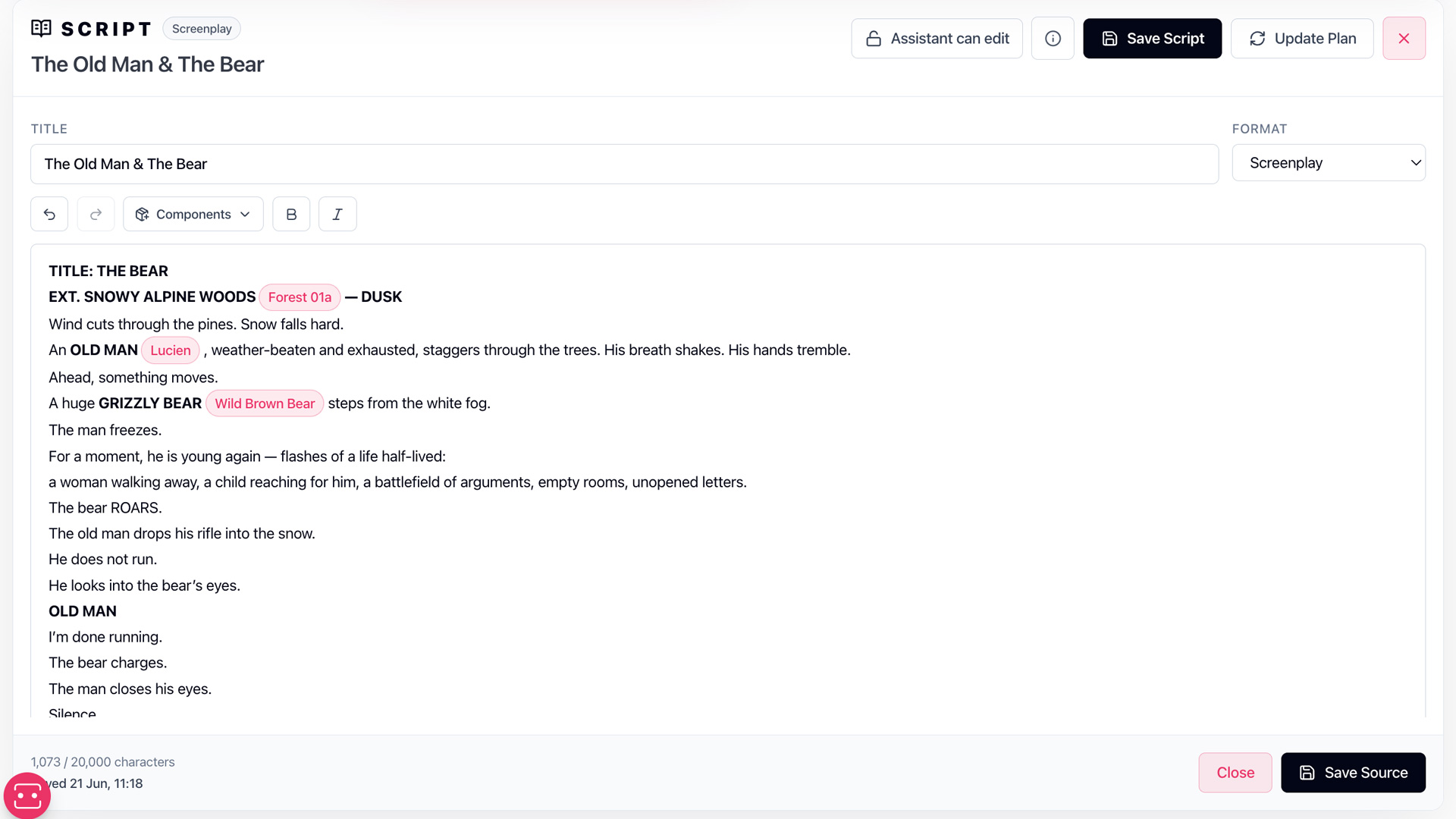
AIAnimation.com product view
Planning from a shared script
3. Break the work into production elements
The script must then become a production structure.
Divide it into scenes and shots. Identify recurring characters, environments, props, vehicles, costumes, graphic elements and audio requirements. These elements form the shared reference system for the project.
A basic shot record might include:
| Field | Purpose |
|---|---|
| Shot ID | Gives the shot a stable production identity |
| Scene | Connects the shot to its narrative context |
| Description | States what the audience sees |
| Story purpose | Explains why the shot exists |
| Duration | Sets an editorial target |
| Framing and camera | Defines composition and movement |
| Required elements | Links characters, locations and props |
| Dialogue or audio | Records speech, effects and music needs |
| Status | Shows whether the shot is planned, in progress or approved |
Stable identifiers matter because filenames and generated outputs will change. The shot should remain the same production object even when its media is replaced.
4. Establish visual rules and references
Visual consistency is easier to maintain when the production defines what must stay consistent.
Create reference sets for characters, environments and important props. Record distinguishing features, proportions, materials, colour relationships, costume rules and any details that must not drift between shots.
A reference set should be selective. More references do not automatically produce better results, and conflicting images can make the intended design less clear. Separate approved references from exploratory material so artists and tools know which sources are authoritative.
Style development should also consider how the finished film will be edited. A collection of attractive images is not yet a visual language. Shot scale, lens character, lighting direction, contrast, movement and composition need enough continuity to work as a sequence.
5. Build the storyboard and animatic
Storyboarding tests the film before detailed generation.
Each board frame should communicate the composition, action and relationship to adjacent shots. Add shot numbers, dialogue, action notes and intended duration. Where movement is important, use multiple frames or annotations rather than expecting one still to explain the entire action.
Turn the storyboard into an animatic by placing frames on a timeline with rough dialogue, music or temporary sound. This exposes pacing problems that are difficult to see on a static board.
An animatic can answer practical questions early:
- Is the story understandable?
- Are important actions given enough screen time?
- Are too many shots trying to do the same job?
- Does the sequence vary its scale and rhythm?
- Which shots genuinely require complex motion?
- Could editorial or sound solve a problem more efficiently?
Approving the sequence before high-cost iteration gives the production a stable target.
6. Specify shots before generating them
A generation prompt is only one part of a shot specification.
The specification should state the required action, start state, end state, composition, camera behaviour, duration, references and continuity obligations. It should also identify what can change without damaging the sequence.
For example, background texture may be flexible while character identity, screen direction and a product’s appearance are fixed. Making that distinction helps reviewers judge results consistently.
Shot planning also supports method selection. One shot may be best produced from text, another from an approved image, another through controlled editing, and another through conventional animation or compositing. A professional pipeline does not require every shot to use the same technique.
7. Test methods and models
Different generative systems support different inputs, controls, durations and output characteristics. Test them against the actual requirements of the shot rather than relying on a general ranking.
A useful test plan compares a small number of representative shots:
- Character close-up
- Wide environment
- Physical action
- Camera movement
- Dialogue or performance
- Transition or effects shot
Record the settings, references and source files used. Judge results on production criteria such as continuity, controllability, editability and repeatability—not only on the appeal of a single output.
For more on evaluating tool categories, see Best AI Video Production Platforms.
8. Generate, select and retain provenance
Generation usually produces candidates rather than finals. Keep the relationship between each candidate and its shot, source references, prompt, settings and model route.
A clear naming or asset-management system should distinguish:
- Explorations
- Selected candidates
- Work in progress
- Approved masters
- Superseded versions
Do not overwrite an approved result when creating a revision. Version history allows the team to compare changes, recover earlier decisions and understand why a shot evolved.
Retain provenance appropriate to the project. This may include prompts, generation dates, model identifiers, source assets, editing steps and approval notes. The required level will depend on the production’s commercial, legal and organisational context.
9. Review against shot intent
Review should answer whether a result performs its production role.
A visually impressive clip may still be wrong if it breaks continuity, changes a character, reverses screen direction, obscures a product or fails to cut with neighbouring shots. Review candidates in sequence whenever possible.
Feedback should be specific and actionable. “Make it better” is not a production note. “Keep the approved costume, reduce camera movement and hold the final pose for one second” identifies what must change and what must remain fixed.
Assign approval authority clearly. Creative, client, brand, legal and technical approval may come from different people. A visible status prevents informal comments from being mistaken for final sign-off.
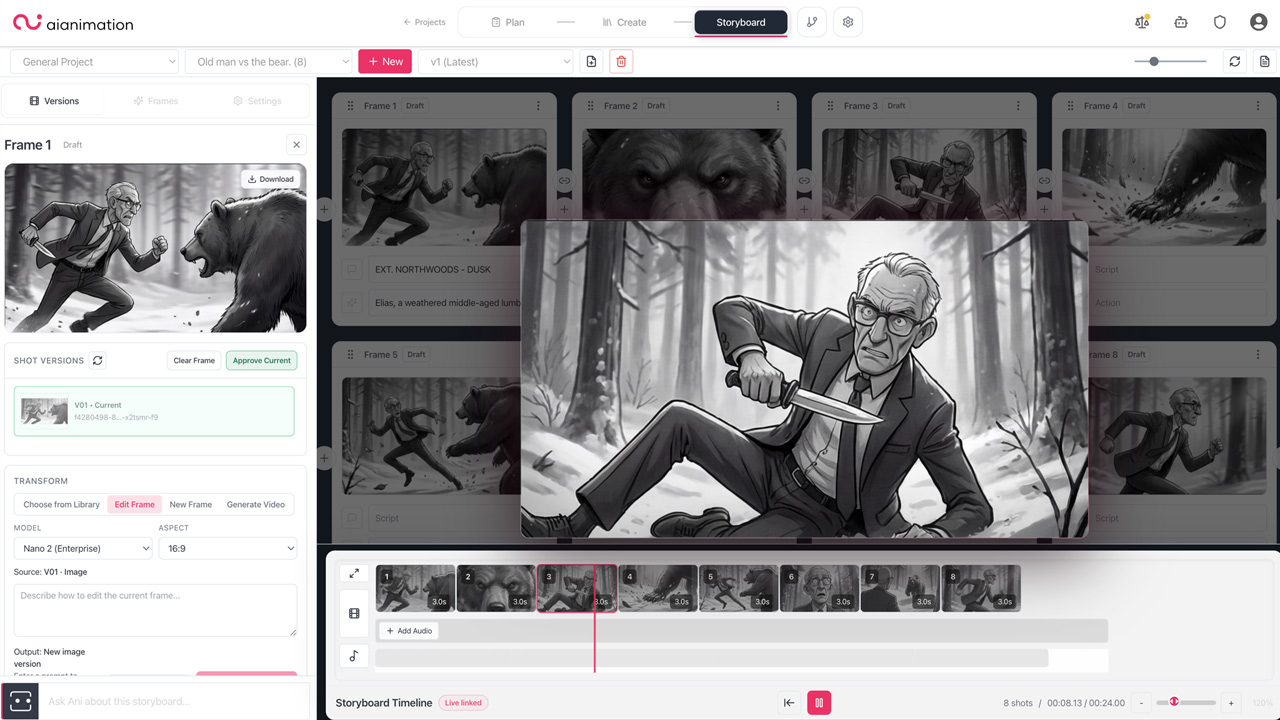
AIAnimation.com product view
Reviewing a shot in sequence
10. Edit and finish the film
Editorial turns approved shots into a film. Trim generated clips to their strongest usable sections, adjust timing and use cutaways or reaction shots to manage imperfect motion.
Finishing may include compositing, cleanup, retiming, stabilisation, typography, colour work, upscaling and format conversion. Conventional post-production remains valuable because not every issue should be solved through another generation.
Sound is equally important. Dialogue editing, effects, ambience and music create continuity between shots that may have been produced through different methods. Review picture and sound together before final approval.
11. Deliver and archive
Define delivery requirements before final export. Common outputs include high-quality masters, platform-specific derivatives, captions, textless versions, audio stems, project files and review copies.
Archive the approved media alongside the records needed to understand it later: shot structure, source assets, permissions, prompts, model information, edit decisions and approval history. A usable archive supports revisions, localisation and future episodes without reconstructing the production from memory.
A pipeline is a shared production language
The value of a pipeline is not that every project follows an identical sequence. It is that everyone can see what the production is trying to make, what has been decided, what remains unresolved and which version is approved.
Teams building this capability internally should define their workflow before assembling tools. How to Build an AI Animation Studio covers the people, systems and operating choices around the pipeline.
Common questions
Frequently asked questions
Is an AI animation pipeline linear?
No. The stages provide shared production language, but work often loops: an animatic can change the script, model tests can change a shot, and editorial can expose continuity issues.
When should a team choose an AI video model?
After the brief, production structure and representative shot requirements are clear. Test models against actual shot types rather than selecting one from a general ranking.
Why storyboard before generating video?
A storyboard and animatic test the sequence, coverage and timing before the team spends heavily on high-iteration shots. They make the production target visible.
What should be archived with an AI-generated shot?
Retain the approved media and enough context to understand it later, such as the shot record, source references, permissions, prompt or settings, model route, edit decisions and approval history.
How this guide was reviewed
Written by AI Animation Editorial Team and reviewed by AI Animation Production Team. It separates general production practice from product-specific claims. Changing platform capabilities are checked against first-party documentation and carry a visible review date.