
Define the studio before choosing the tools
Start by deciding what the studio will sell or support.
| Studio focus | Typical work | Operational priority |
|---|---|---|
| Visual development studio | Style frames, characters, environments and pitch material | Fast exploration and strong art direction |
| Short-form content studio | Social films, product clips and campaign variations | Repeatable formats and delivery volume |
| Animation production partner | Storyboards, animatics, shots and sequences | Continuity, editorial structure and collaboration |
| Full-service production company | Concept through final master | Producing, post-production and client approval |
| In-house creative team | Brand and internal content | Brand control, access and governance |
A studio can expand later, but a narrow initial offer makes it easier to define staffing, pricing, software and quality standards. “We use AI” is not an offer. “We produce approved product films from brief to delivery” is.
Operating model
The studio operating system
Shared operating system
AI animation studio
Production pipeline
Coordinates every operational pillar
- Brief & creative direction
- People & roles
- Model access
- Assets & references
- Review & rights
- Editorial delivery
Build a team around responsibilities
A small studio does not need a separate person for every role, but it does need clear ownership.
| Responsibility | Core work |
|---|---|
| Creative director | Interprets the brief and owns creative quality |
| Producer | Manages scope, schedule, budget, reviews and delivery |
| Writer or story lead | Develops treatments, scripts and narrative structure |
| Visual development artist | Creates the style system, characters and environments |
| AI artist or technical director | Selects models, builds reference workflows and iterates shots |
| Storyboard artist or editor | Designs shots, timing and sequence |
| Compositor or finishing artist | Cleans, combines and finishes generated material |
| Operations or governance owner | Manages access, records, rights evidence and provider requirements |
In a lean studio, a creative director may also develop prompts and references, while an editor handles storyboards and finishing. As volume grows, split roles at the points where work is repeatedly delayed or quality becomes inconsistent.
Specialists should be selected for the brief, not simply for familiarity with a fashionable model. Animation, cinematography, design, performance, compositing and sound remain valuable disciplines.
Design the production pipeline
Document the path from client request to delivered master. A practical starting point is:
- Brief and feasibility
- Treatment or script
- Scene and shot breakdown
- Character, environment and style development
- Storyboard and animatic
- Shot generation
- Review, selection and iteration
- Edit, compositing, sound and colour
- Client approval
- Delivery and archive
Define the output and owner of every stage. A storyboard should have an approval state. A generated shot should have a current version. A final master should be traceable to an agreed delivery specification.
The pipeline should permit iteration without losing context. For a more detailed structure, see The Complete AI Animation Production Pipeline.
Adopt a multi-model strategy
No model is best at every production task. Capabilities can differ in motion, image fidelity, reference handling, audio, lip-sync, duration, editing and cost.
Maintain a simple internal test matrix:
- What task was tested?
- Which model and route were used?
- Which references and settings were supplied?
- What succeeded or failed?
- How much generation and artist time was required?
- Is the route permitted for this client or project?
- What finishing was needed?
Use lower-cost or draft routes for exploration when appropriate, then test final-quality routes against the actual delivery requirement. Avoid building a studio promise around one model feature that may change or disappear.
A multi-model workflow does not mean using every model. It means retaining the ability to choose deliberately.
Create a consistency system
Character and visual consistency are production responsibilities, not a single prompt setting.
For each recurring character, location or style, create a controlled reference package containing:
- A concise written description
- Approved front, side and three-quarter views where useful
- Wardrobe, colour and material notes
- Scale and proportion guidance
- Expression or performance references
- Environment and lighting rules
- Examples of approved and rejected directions
- Current version and owner
Treat these as production components rather than loose images. Link them to shots, use consistent naming and review sequences rather than isolated frames. Start- and end-frame controls, reference images and model-specific identity features can help, but none removes the need for art direction and finishing.
Choose a stack that can hand work forward
Evaluate software by production layer rather than by the length of its feature list.
| Layer | Questions to ask |
|---|---|
| Planning | Can the team connect the brief, script, scenes and shots? |
| Visual development | Can approved characters, locations and styles be reused? |
| Generation | Does the stack support the models and controls required by the work? |
| Asset management | Can people find the current asset, references and generation history? |
| Storyboard and edit | Can shots be ordered, timed, reviewed and exported? |
| Collaboration | Are roles, comments and approval states clear? |
| Finishing | Can media move into established editorial, VFX and audio tools? |
| Governance | Can access, provider routes and supporting evidence be reviewed? |
AIAnimation.com product view
Keeping production assets together
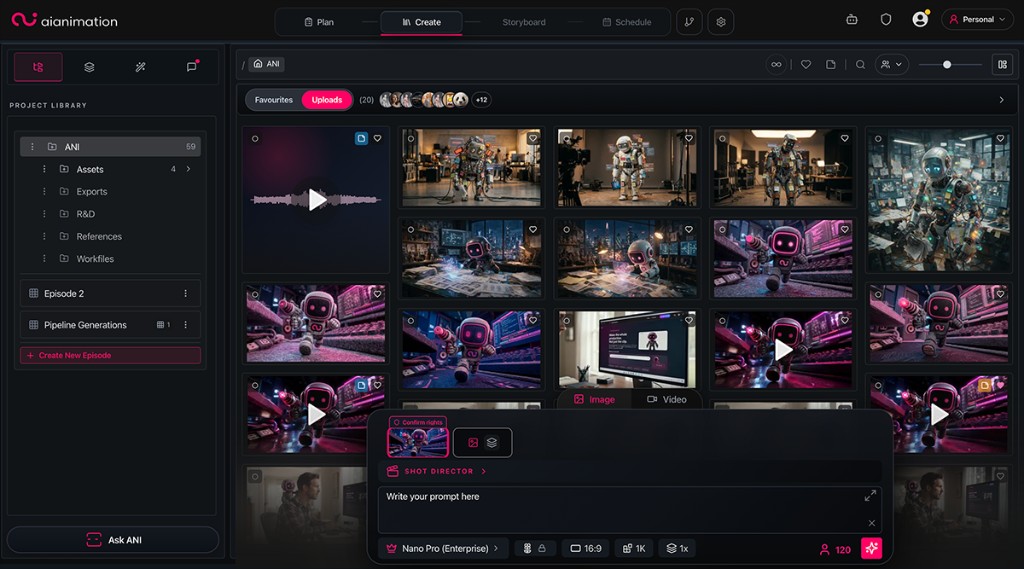
Do not assume everything must live in one application. A modular stack can work well if naming, storage, ownership and hand-offs are disciplined. Conversely, adding more tools can create duplicated assets and lost decisions. Prefer open exports and clear records over a workflow that depends on one interface.
Plan studio economics around approved work
The cheapest generation is not necessarily the cheapest usable shot. Track the cost of approval:
Approved-shot cost = generation spend + artist time + review time + finishing time + failed attempts
Measure at project level:
- Attempts per approved shot
- Artist hours per finished minute
- Review rounds
- Model and infrastructure spend
- Finishing and sound costs
- Delivery changes
- Gross margin after revisions
Price the service around scope, deliverables, review rounds and production responsibility—not an assumed number of prompts. Include contingency for model failures, changing client feedback and shots that need conventional animation or compositing.
A controlled pilot is the safest way to establish real numbers. Use a representative sequence, not an unusually easy demonstration shot.
Build review, rights and client controls into the workflow
Agree approval gates before production begins. A useful sequence is:
- Brief and treatment approval
- Style and character approval
- Storyboard or animatic approval
- Representative shot test
- Sequence review
- Offline edit approval
- Final master approval
Also document how the studio handles client assets, real-person likeness, licensed material and model-provider terms. Record relevant prompts, model identifiers, settings, dates, references and approvals when practical.
Before submitting confidential content, establish the processing route, access controls, retention position and contractual requirements. Do not describe a workflow as private, licensed-data-only or no-training unless the relevant provider route and agreement support that statement.
Run a 90-day studio pilot
Days 1–30: define and test
- Choose one service and one representative project
- Map the pipeline and assign owners
- Establish folder, naming and version conventions
- Test a small set of models against real shot types
- Create the first approved reference packages
Days 31–60: produce a complete sequence
- Build a storyboard and animatic
- Generate and finish a short sequence
- Track attempts, time, cost and review notes
- Test editorial, sound and delivery hand-offs
- Identify where context or assets are being lost
Days 61–90: standardise
- Turn successful steps into templates and checklists
- Define approval gates and client-facing language
- Remove tools that duplicate work
- Document model-selection and escalation rules
- Review economics before increasing volume
The objective is not to prove that AI can make an impressive clip. It is to prove that the studio can repeatedly deliver approved work.
Common mistakes
Avoid these early failure modes:
- Buying tools before defining the studio’s offer
- Treating prompts as the only reusable production knowledge
- Depending on one model for every shot
- Generating before the brief, references or edit are clear
- Keeping approved and experimental assets together
- Promising perfect consistency or guaranteed speed
- Ignoring sound, compositing and delivery
- Leaving rights and provider questions until final approval
- Measuring output volume instead of approved results
Where AIAnimation.com fits
AIAnimation.com is one example of a connective production layer for this kind of studio. It provides a multi-model workspace around briefs, scripts, production components, scenes, shots, storyboards, generations, review and exports. Team and organisation workspaces can add shared libraries, roles, pooled credits, approval workflows and production history, subject to plan and workspace configuration.
It is not the entire studio and does not replace specialist finishing tools. Its role is to keep production context available while teams move between supported models and established editorial pipelines.
To compare that approach with model-specific interfaces, custom pipelines and other platforms, see Best AI Video Production Platforms.
Common questions
Frequently asked questions
What is an AI animation studio?
It is a production organisation that combines creative direction, generative tools, asset and version management, editorial craft, review and delivery. It is not simply a collection of model subscriptions.
Which roles does a small AI animation studio need?
At minimum, the studio must own creative direction, production, visual development and generation, editorial and finishing, and rights or operational controls. One person can cover several responsibilities at first.
Should a studio standardise on one AI video model?
Usually not. A studio should test models and methods against representative shot types, retain a small approved toolset, and choose by production requirement rather than trying to use every available model.
How should an AI animation studio price work?
Price around scope, deliverables, review rounds and responsibility. Track the cost of an approved shot, including failed generations, artist time, review and finishing—not only the price of a successful model run.
How this guide was reviewed
Written by AI Animation Editorial Team and reviewed by AI Animation Production Team. It separates general production practice from product-specific claims. Changing platform capabilities are checked against first-party documentation and carry a visible review date.